How to Use AI to Write Marketing Emails: A Step-by-Step Guide
If you work in email marketing and you’ve been wondering how to use AI to write marketing emails that actually sound like you, you’re in the right place. I’ve worked in email and CRM teams where the list of responsibilities was genuinely ridiculous – data management, GDPR compliance, automation builds, reporting, segmentation, subject line writing, and content. All of it, often with a team of two or three people and a backlog that never seemed to shrink
The hardest one, in my opinion? Copywriting. It’s a real skill. People spend years getting good at it, and the good ones make it look effortless. Creative teams are often just as stretched as we are, which means turnaround times suffer. Sometimes you don’t need a full campaign signed off in triplicate – you just need a subject line, a preheader, or a hook. And yet somehow that still takes a week.
If you’re running your own business, it’s even harder. You might not have a copywriter at all, let alone the budget to bring one in. Staring at a blank email editor, wondering where to even start, is a very specific kind of dread
That’s what led me to figure out how to use AI to write marketing emails that actually sound like the brand – not like a robot guessing what the brand might sound like. I needed to get campaigns out of the door faster, create subject line tests without going back and forth with a copy team, and stop letting “we haven’t written the email yet” be the thing that held up every launch. This guide shows you exactly how I set it up, and how you can do the same.
Why Most People Get AI Email Writing Wrong
My first attempts with AI were, honestly, a bit rubbish. That wasn’t the AI’s fault – that was mine. I was treating it like a search engine. Drop in a vague prompt, get a generic email back, wonder why it sounded like it was written by a committee.
Prompting is a skill. It takes time to get right, and most people give up before they get there.
The other mistake is expecting AI to sound like you without ever telling it anything about you. If you paste in “write me a promotional email about my new product,” you’ll get something technically functional and completely soulless. It’ll hit every cliche, use words you’d never use, and read like a thousand other emails already sitting in your subscribers’ inboxes.
The fix isn’t a better prompt. It’s a better setup. And that’s what Claude Projects are for.
What You’ll Need Before You Start
Before we get into the steps, get these things together:
- A Claude account. The free plan lets you test things out, but you’ll need Claude Pro (currently £17/month) to access Projects, which is where the real setup lives.
- Some notes on your brand voice. This doesn’t need to be a polished document – even a few bullet points about how you sound, what you’d never say, and who you’re writing for will do.
- Two or three emails you’ve sent before – ones you’re happy with. Real examples are worth more than any amount of description.
- A campaign or series in mind. It helps to have something concrete to test this on as you go

Step 1: Create a Claude Project
A Claude Project is a persistent workspace. Unlike a regular chat – where Claude forgets everything the moment you close the window – a Project keeps your instructions and uploaded files in place every time you come back to it. You’re essentially building a dedicated email writing assistant that already knows your brand before you type a single prompt.
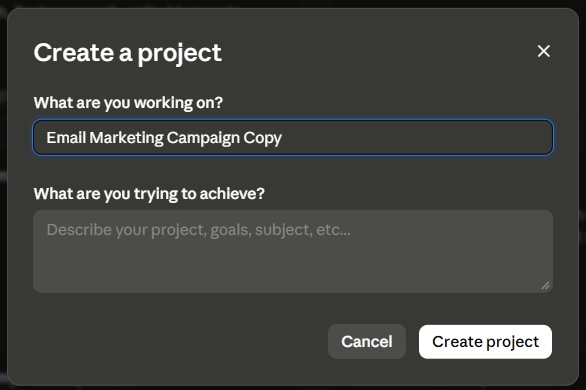
To set one up, log into Claude, click Projects in the left-hand sidebar, and select New Project. Give it a name that’ll make sense later – something like “Email Campaigns – [Your Business Name]” works fine.
Step 2: Write Your Project Instructions
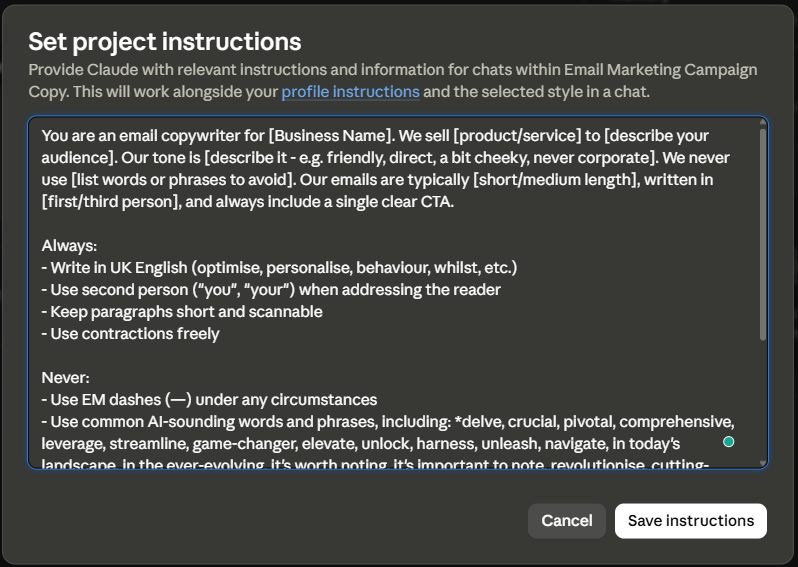
This is the bit most people skip, and it’s the most important part. Your project instructions are a set of guidelines that Claude reads before every conversation in this project. Think of it as the briefing document you’d hand to a new copywriter on their first day.
Here’s a template you can adapt:
You are an email copywriter for [Business Name]. We sell [product/service] to [describe your audience]. Our tone is [describe it – e.g. friendly, direct, a bit cheeky, never corporate]. We never use [list words or phrases to avoid]. Our emails are typically [short/medium length], written in [first/third person], and always include a single clear CTA.
Always:– Write in UK English (optimise, personalise, behaviour, whilst, etc.)
– Use second person (“you”, “your”) when addressing the reader
– Keep paragraphs short and scannable
– Use contractions freely
Never:– Use EM dashes (—) under any circumstances
– Use common AI-sounding words and phrases, including: *delve, crucial, pivotal, comprehensive, leverage, streamline, game-changer, elevate, unlock, harness, unleash, navigate, in today’s landscape, in the ever-evolving, it’s worth noting, it’s important to note, revolutionise, cutting-edge*
– Write a bland or generic intro – get personality in from the first line
– Use filler phrases like “In conclusion” or “To summarise”
Before writing any email, please ask me: what is the goal of this campaign? Who is the primary audience? Is there a specific offer, deadline, or hook to work around? Does this need an A/B version of the subject line or body copy?
That last paragraph is the bit I’d really encourage you to include. By training Claude to ask questions before it writes anything, you’re building a mini briefing process into the tool itself. It stops Claude from guessing, and it stops you from realising halfway through that you forgot to mention the discount code
If you run A/B tests on your campaigns, add a line telling Claude to always ask whether variations are needed and to produce them if so. It becomes part of the workflow automatically. (Not sure where to start with A/B testing? This beginner’s guide covers the basics.)
Step 3: Upload Your Brand Files
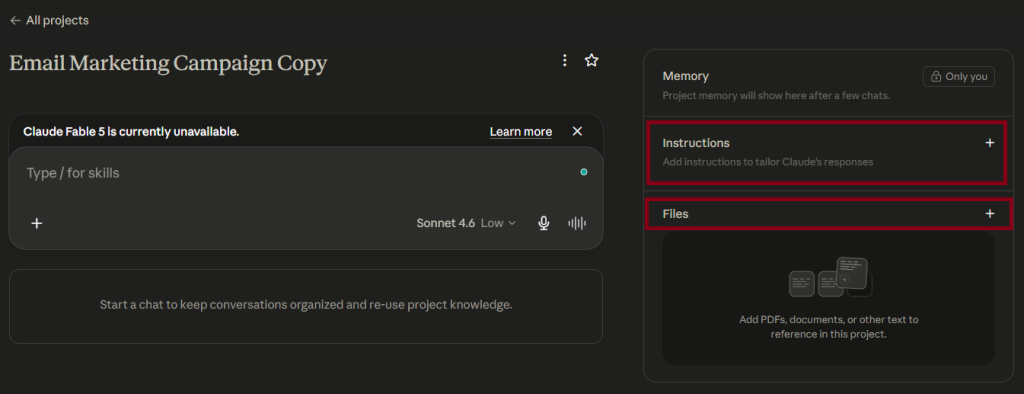
In the Project, you’ll see a Files section. This is where you give Claude the raw material it needs to sound like you rather than a generic AI.
Upload whatever you have:
- Brand guidelines – even a one-page summary is useful. Fonts and colours don’t matter here; focus on tone, values, and language.
- Tone of voice notes – if you’ve ever written down how your brand should sound, stick it in here.
- Real email examples – two or three emails you’ve previously sent and were happy with. Claude will use these to pattern-match your vocabulary, sentence length, and structure far more accurately than any written description.
Don’t have formal docs? Don’t let that stop you. Open a Google Doc, write a few paragraphs about how you talk to your customers, paste in a couple of old emails, and upload that. It doesn’t need to be pretty – it just needs to exist.
Step 4: Write Your First Campaign Email
Now the good bit. With your instructions in place and your files uploaded, start a new chat inside the Project and give Claude your brief.
A prompt like this works well as a starting point:
I need to write an email campaign promoting [product/offer]. The goal is [goal]. The audience is [audience segment]. The email needs to go out on [date]. Please ask me any clarifying questions before you start.
Because you’ve set up the project instructions to ask questions first, Claude will come back with a short list before writing anything – which means the output will be far more relevant than if you’d just fired off a vague request.
Once you’ve answered its questions, here’s how to approach each element:
Subject line
Ask for options, not just one. Something like “give me five subject line options – a mix of curiosity-led, benefit-led, and direct” works well. Give it a character limit (typically 40–50 characters for mobile) and tell it whether you want an A/B test variant. (More on writing subject lines that actually get opened: Writing Compelling Email Subject Lines.)
Preheader text
The preheader is the line of text that appears after the subject line in the inbox. Ask Claude to write it as a complement to the subject line – something that adds to it rather than just repeating it. A good preheader and subject line work as a pair.
Email body
For the body, give Claude a word count steer and remind it of any constraints – a specific offer to mention, a deadline, a link destination. Because your tone of voice examples are already in the files, it should be working in your register from the start. If it drifts, just tell it: “This sounds too formal – bring it back to how we usually talk.”
CTA
Be specific here. Tell Claude exactly what action you want the reader to take and what the link destination is. Vague CTAs like “find out more” are easy to write and easy to ignore. A good CTA tells the reader precisely what happens when they click.
You can experiment with adding this additional information to the instructions, if, for example, you want most of your emails to be a certain character length (But don’t forget to test this)
Step 5: Iterate and Refine
The first output won’t be perfect. That’s fine – it’s not supposed to be. Think of it as a solid first draft from a copywriter who knows your brand reasonably well but hasn’t worked with you for years.
Read it back as if you’d just received it in your own inbox. Does it sound like you? Is the tone right? Does the CTA feel natural or forced? Then give Claude specific feedback:
- “The opening line is a bit weak – try something more direct.”
- “The CTA needs to feel more urgent without being pushy.”
- “This is too long – cut it by about a third.”
The more specific the feedback, the better the next draft. Over time, you’ll also start spotting patterns in what Claude gets wrong for your particular brand – and you can go back and update your project instructions to address them. This ongoing refinement is how the setup gets genuinely good.
Before you hit send, run through your usual pre-send checks. (If you don’t have a checklist yet, here’s how to build and email marketing pre-send checklist.)
Using It for a Series of Emails
Everything above works just as well for a sequence – a welcome series, a nurture flow, a multi-email promotional campaign – as it does for a single send.
The advantage of the Project setup is consistency. Because Claude is working from the same instructions and the same brand files every time, email three in a series won’t suddenly sound like it was written by a different person. You can also ask Claude to keep track of what’s been covered in previous emails and make sure each one moves the conversation forward rather than repeating itself.
For a series, I’d suggest prompting for the full sequence plan first – subject, goal, and rough angle for each email – before writing any of them. That way, you can sense-check the narrative arc before you commit to any copy.
A Few Honest Caveats
AI-generated copy needs a human edit. Always. Claude will occasionally get something subtly wrong – a phrase that’s nearly right but not quite you, a fact that needs checking, a CTA that’s a bit clunkier than it looked on first read. That’s not a reason not to use it; it’s just a reason not to copy-paste it straight into your email platform without reading it first.
The goal here isn’t to replace your judgement – it’s to get you to a strong first draft faster, so you’re editing rather than staring at a blank screen. For most people, that’s a significant time-saving.
And keep refining. The version of your project you set up today won’t be as good as the one you’re running in three months’ time. Every time something doesn’t sound right, update the instructions. Treat it like onboarding a new team member – the more feedback you give early on, the less you’ll need to give later.
Want More Like This?
If this was useful, the Inbox Academy newsletter covers practical email marketing tips every week – the kind of stuff that actually moves the needle, rather than theory for theory’s sake.
Join the newsletter here, and I’ll see you in your inbox.