
How to Fix Email Deliverability Problems (When You’re Already in Trouble)
Let me tell you about the time I watched a perfectly good sender reputation get destroyed in real time, and what it taught me about how to fix email deliverability problems before they finish you off for good.
At a company I once worked at, one of our teams in Europe managed to wreck the IP and sender reputation for two brands. We never properly got it back.
We picked it up through some routine reporting: a sudden spike in bounces and spam complaints across every campaign we were running. A bit of head scratching and some proper detective work later, we’d isolated it to one inbox provider. We pulled them out of the sends, slowly reintroduced our most engaged contacts, and tried everything by the book. Too late. Reputation in tatters.
The full story? Someone in marketing had rented a list (yes, rented, that’s a real thing people still do), uploaded it, and fired off a promotional email without thinking about what it might do. One email. Two ruined sender reputations.
I’m telling you this not to scare you, well, maybe a little, but because most advice on this topic assumes you’re starting from a clean slate. You’re not always that lucky. Sometimes you’re already in the middle of it, watching open rates fall off a cliff and wondering what on earth happened.
So how do you actually fix email deliverability problems? You find the real cause (authentication, reputation, list quality, or engagement; it’s usually one of these four), isolate the damage, and rebuild trust with mailbox providers slowly and deliberately. There’s no single setting you can flip. Anyone who tells you otherwise hasn’t had to do it themselves.

How to Tell If You’ve Actually Got a Deliverability Problem
Before you can fix anything, you need to know what you’re dealing with. In our case, it showed up as a sudden jump in bounces and complaints across every campaign, not just one. That’s usually the first sign something’s properly wrong, rather than one email just having an off day.
Other signals worth watching for:
- Open rates are dropping suddenly, with no change to your content, subject lines, or send times
- Bounce rates are climbing above what’s normal for your list
- Spam complaints are rising, even slightly, since the acceptable threshold is tiny
- Turning up on a blocklist like Spamhaus
If you’re not sure what “normal” even looks like for your list, our guide to email marketing metrics is a decent starting point.
If you spot any of the above, don’t just tweak your subject lines and hope. Go looking for the cause.
Find the Root Cause Before You Touch Anything Else
It’s tempting to start fiddling with everything at once. Resist that urge. Deliverability problems almost always trace back to one of a handful of causes:
- A bought or rented list (the actual root of my story above)
- Authentication that’s missing, broken, or misconfigured
- A sudden spike in sending volume with no warm-up
- Engagement collapsing because you’ve been mailing people who stopped caring months ago
In our case, it was painfully simple once we found it. Someone wanted a quick win, rented a list, and sent a single promotional email to it. That’s all it took. No malice, just someone not appreciating how fragile sender reputation actually is.
Whatever your cause turns out to be, find it before you start changing things. Fixing the wrong problem just wastes time you don’t have.
Fixing It When Sender Reputation Is the Problem
Your sender reputation is the score mailbox providers quietly assign you based on how you send and how people respond. Think of it as a credit rating nobody shows you, built from your bounce rates, complaint rates, and how engaged your subscribers actually are.
When it tanks, the standard advice is sound, even if it didn’t fully save us:
- Identify which inbox provider is the problem. For us, it was one specific provider. Isolating it meant we weren’t tanking results everywhere at once.
- Pull back to your most engaged contacts for that provider, then slowly reintroduce others as engagement improves.
- Be patient. Reputation recovery isn’t measured in days. It’s measured in weeks, sometimes months.
Here’s the bit that didn’t make it into most guides I’ve read: timing matters more than the textbook version makes it sound. We did everything right, eventually, and it still wasn’t enough. The damage had already compounded by the time we acted. Catch this early, and your odds are genuinely good. Catch it late, and you’re managing the damage rather than reversing it.
Check Your Email Authentication (SPF, DKIM, DMARC, and BIMI)
Before you assume the worst, rule out the basics. If your authentication isn’t set up properly, mailbox providers have every reason to distrust you, regardless of how clean your list is.
- SPF lists which servers are allowed to send on your domain’s behalf
- DKIM adds a digital signature proving your email hasn’t been tampered with
- DMARC tells receiving servers what to do if SPF or DKIM fails, and Gmail and Yahoo now require it for anyone sending 5,000+ emails a day
- BIMI lets your verified logo show up next to your emails once DMARC is properly enforced, a nice trust signal once the basics are sorted
If you’ve never set any of this up, our beginner’s guide to email deliverability walks through it from scratch. This post assumes the foundations are already in and something’s still going wrong.
Fixing a Damaged List
List quality was the actual villain in my story, so it gets its own section.
- Never buy or rent a list. I don’t care how targeted the seller claims it is. Purchased and rented lists are stuffed with invalid addresses and spam traps, and one bad send can undo months of good work, as we found out the hard way.
- Use double opt-in. Yes, it adds friction. It also means everyone on your list actually wants to be there, which matters more than the extra signups you’d get without it. Consent isn’t optional anyway, so you may as well build it in properly.
- Remove hard bounces immediately. Continuing to email a dead address tells providers you’re not paying attention.
- Sunset unengaged subscribers who haven’t opened or clicked in 90 to 180 days. Try a win-back campaign first, but if they don’t respond, let them go. Holding onto silent subscribers feels safer than it actually is.
Warming Up Properly If You’re Rebuilding (or Starting Fresh)
If you’re recovering from a hit like ours, or just moving to a new domain or IP, don’t blast your full volume straight away. Start small, around 10 to 20 emails a day to your most engaged contacts, and increase volume by roughly 10 to 15% a day over 30 to 60 days. It’s slow. It’s also the only way mailbox providers learn to trust you again.
Protecting Yourself Going Forward
Once you’ve fixed the immediate problem, build in some protection so it’s harder to happen twice.
- Separate your mail streams. Send transactional emails (receipts, password resets) from a different subdomain than your marketing sends, so one bad campaign can’t drag down emails your customers actually need.
- Keep your spam complaint rate under 0.1%. Once you hit 0.3%, Gmail and Yahoo will actively start routing you to junk.
- Make unsubscribing genuinely easy. A clear one-click link. If people can’t find it, they’ll hit “mark as spam” instead, and that hurts far more.
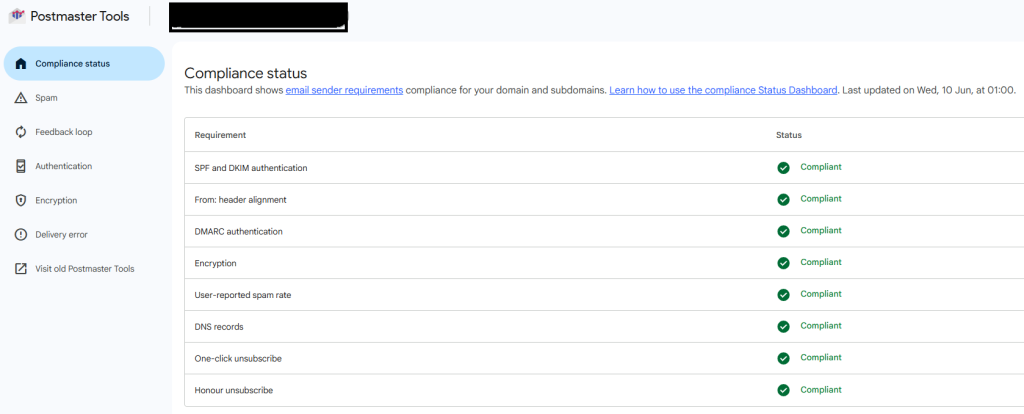
- Monitor your reputation properly, using free tools like Google Postmaster Tools, Microsoft SNDS, and Yahoo Sender Hub, and check you’re not sitting on a blocklist somewhere.
None of this is glamorous. It’s also the difference between catching the next problem in days rather than discovering it three campaigns too late, the way we did. If you want a repeatable way to build these checks into your routine, our email marketing campaign checklist is worth borrowing from.
A Few Quick Content Checks Worth Doing Anyway
Technical reputation matters more than content these days, but a few basics are still worth checking:
- Keep a healthy text-to-image ratio, aim for at least 60 to 80% text, so filters don’t mistake you for someone hiding spam behind a single image
- Avoid URL shorteners like Bitly. Spammers use them to disguise dodgy links, so filters penalise them on sight
- Keep your HTML clean and mobile-responsive. Broken code is more likely to trip a spam filter than you’d think
The Short Version: How to Fix Email Deliverability Problems for Good
If there’s one thing I’d tell anyone reading this whose deliverability is currently fine: don’t wait until it isn’t. Check your authentication now. Clean your list before it needs cleaning. And maybe, just maybe, have a quiet word with anyone in your business who might be tempted to rent a list “just this once.” Trust me on that last one.
If your reputation’s already in trouble, work through the causes above in order. Find the real problem, fix that first, and give it the time it actually needs. It’s slower than anyone wants it to be, but it’s the only way that actually works.
Want more of this kind of thing, the stuff that actually happens rather than the textbook version? Join The Inbox Academy newsletter, and I’ll send you real lessons from the inbox, not just theory.