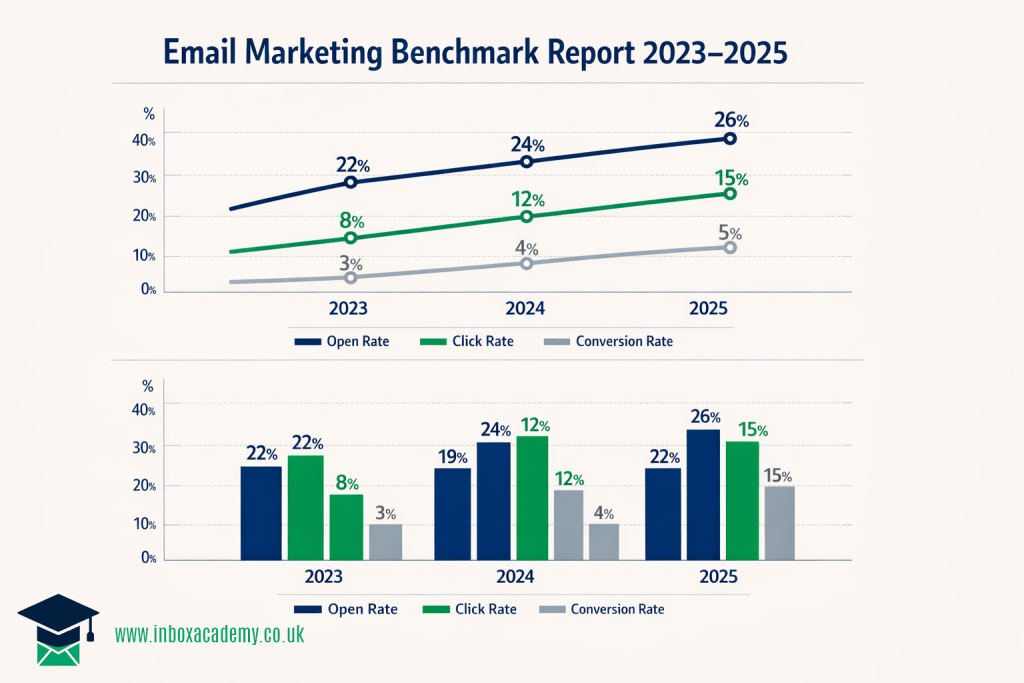
Creating an email marketing benchmark report
An email marketing benchmark report is a tool used to evaluate the performance of your email campaigns by comparing your metrics against a standard. This standard can be external, such as the performance of competitors or industry averages, or internal, such as your own past performance.
Think of benchmarks as “world rankings” for email marketing. These reports help you:
Gauge Success: They provide context for your numbers. For example, a 20% open rate might seem low until you see that the industry average is 15%.
Identify Opportunities: They highlight where your campaigns shine and where there is room for growth compared to your peers or past campaign performance.
Set Realistic Goals: They help you establish baselines for future performance and determine if your current strategies are meeting business objectives.
How to Create an Email Marketing Benchmark Report
Creating a benchmark report involves gathering your own data, selecting appropriate comparison points, and analysing the gaps. Here’s our 8-step-by-step guide on how to create a benchmark report specifically for email marketing data.
1. Determine the objective
Clearly define the objective of your benchmark report. Are you looking to assess the overall effectiveness of your email campaigns, measure subscriber engagement, evaluate conversion rates, or compare your performance to industry benchmarks? Establishing a clear objective will guide your analysis.
2. Define Your Key Performance Indicators (KPIs)
First, determine which metrics align with your business goals. While “vanity metrics” like open rates are common, financial metrics often carry more weight with stakeholders.
Common Metrics: Open Rate, Click-Through Rate (CTR), Click-to-Open Rate (CTOR), and Unsubscribe Rate.
Deliverability Metrics: Bounce Rate (hard and soft), Delivery Rate, and Spam Complaint Rate.
Financial Metrics: Conversion Rate, Revenue Per Email, and Revenue Per Subscriber.
3. Gather Data
Collect performance data from your Email Service Provider (ESP) or analytics tools: To get a true picture of your performance, it is often recommended to look at data over a longer period (e.g., year-over-year or month-over-month) rather than isolated campaigns.
Pro-tip: Ensure you understand how your ESP calculates these metrics, as definitions can vary slightly between platforms
4. Select Your Benchmarks (The Comparison)
You need a standard to compare your data against. You can use:
Industry Averages: Compare your stats to aggregated data for your specific industry (e.g., Retail vs B2B vs Non-profit). Industry benchmarks vary significantly; for instance, the “Religion” industry sees open rates near 60%, while others may hover around 20%.
Internal History: Compare current campaigns against your own past performance to track improvement over time.
Top Performers: Don’t just settle for “average.” Try comparing yourself to the top quartile (the top 25% of performers) to drive true excellence.
5. Analyse the Gap
Compare your internal data against the selected benchmarks
Identify Weaknesses: If your open rate is below the benchmark, you may need to test new subject lines or send times. If your CTR is low but opens are high, your content or Call to Action (CTA) might need optimisation.
Contextualise: Remember that metrics are relative. A low open rate might be acceptable if the conversion rate and revenue per email are high
6. Visualise and Report
Make the data easy for stakeholders to digest.
Use Visuals: Incorporate charts, graphs, and infographics to display trends clearly.
Focus on the “Why”: Don’t just report the numbers; explain why performance met or missed the benchmark (e.g., “Open rates declined due to a lack of list hygiene”).
7. Turn Insights into Action
The ultimate goal of the report is to improve future performance. Use the findings to inform your strategy:
A/B Testing: Test variables like subject lines, call to actions, or layouts to improve specific lagging metrics.
List Hygiene: If deliverability benchmarks aren’t met, clean your email list to remove inactive or invalid addresses.
Segmentation: If engagement is low, use segmentation to send more relevant content to specific groups
8. Monitor and update regularly
Email marketing benchmarks and performance can change over time, so it’s important to monitor and update your benchmark report regularly.
Keep tracking the identified metrics, analyse new data, and update your benchmarks accordingly.
This allows you to stay informed about changes in performance and make data-driven decisions to continuously improve your email marketing efforts.